In the manga
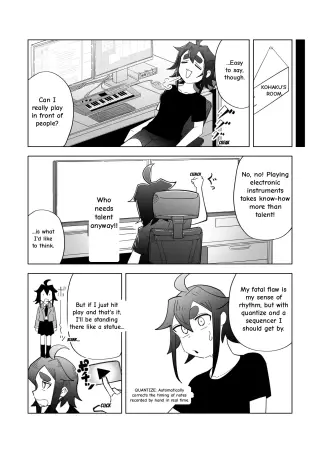
In SIGNAL 9, with the culture festival live show coming up, Kohaku sits in her room thinking about what kind of performance to give.

No, no! Playing electronic instruments takes know-how more than talent!
My fatal flaw is my sense of rhythm, but with quantize and a sequencer I should get by.
But if I just hit play and that’s it, I’ll be standing there like a statue…
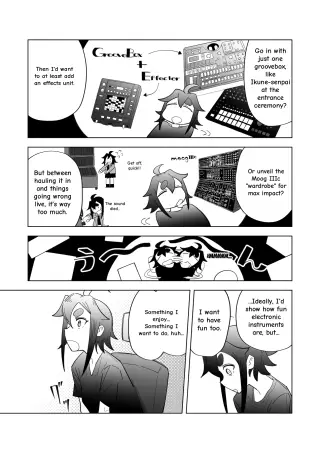
Even with a machine that plays by itself, pressing a button and watching isn’t a live show. After going back and forth, Kohaku settles on a performance built around a groovebox, just like Ikune-senpai’s at the entrance ceremony (SIGNAL9 p.15). In this lesson, we’ll use everything we’ve learned so far to see how one person can perform a whole song.
The groovebox: a whole song in one box
A groovebox (in the Japanese original, the characters shorten it to “gurubo”) is an electronic instrument that packs the tools for making and performing a song into a single unit. Inside, you might find things like these.
- SequencerRemembers which part plays when.LESSON 09
- Drum soundsMakes the rhythm sounds, like the kick drum and snare.LESSON 09
- SynthesizerCreates the bass and melody sounds.LESSON 06
- SamplerTakes in recorded sounds and plays them.LESSON 08
- EffectsAdds effects such as reverb, distortion and wobble.
- MixerBalances the volume and tone of each part.
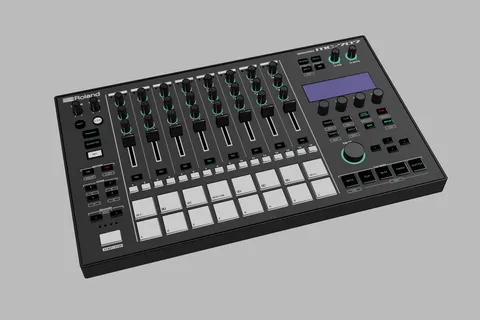
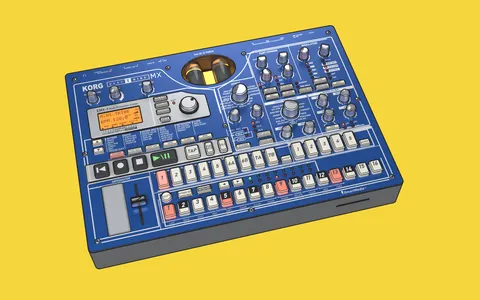
It’s easiest to think of it as a drum machine, a synthesizer and a sampler sharing one box. Each part’s playing is split into tracks, and you can start, stop or change the sound of each one separately. That’s what lets one person build up a song on the spot in a live show. The Electribe EMX-1 that Ikune-senpai played at the club introductions in SIGNAL 1 and the MC-707 that Kohaku uses in her show are both grooveboxes.
Sampling: turning recorded sound into an instrument
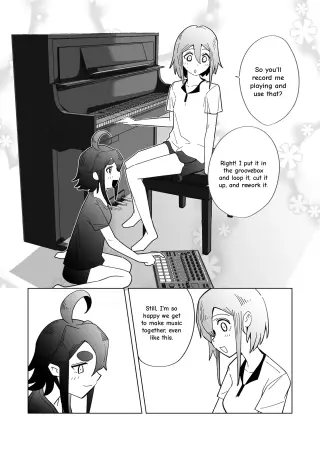
To get ready for the show, Kohaku asks her younger sister to play the piano and records it. When her sister asks, “So you’ll record me playing and use that?”, Kohaku answers:
Right! I put it in the groovebox and loop it, cut it up, and rework it.
Taking in recorded sound and using it as an instrument sound is called sampling. It works the same way as PCM in LESSON 08: the sound is stored as numbers and played back later. The difference from a PCM sound source is that you record the sounds yourself. Not just piano: voices, the sound of hitting things, the sounds of the street. Anything you can record can become an instrument.
- Loop: play part of a recording over and over with no gap. Loop a one-bar phrase, and the backing keeps going for as long as you like.
- Cut-up: chop a recording into small pieces, then shuffle or repeat them. You get rhythms and melodies that weren’t in the original performance.
- Changing the pitch: play it back faster and it goes higher; slower, and it goes lower. Spread one sound across the keyboard and you can play a melody with it.
Back in 1979, when the Fairlight CMI came out, a sampler that played recorded sounds from a keyboard was a very expensive machine. When samplers became cheaper and smaller in the 1980s, music built on sampling itself was born, like hip-hop, which takes snippets of records and rearranges them.
At the show, the first thing Kohaku plays is the piano she recorded here.
First, the sampled piano and the bass!
Her sister said, “Still, I’m so happy we get to make music together, even like this.” With sampling, the sister who plays piano and Kohaku at the groovebox can perform together inside one song.
Quantize: lining up the timing
What Kohaku was worried about was her own sense of rhythm. The manga’s footnote describes quantize as a function that “automatically corrects the timing of notes recorded by hand in real time.”
If you record your playing on keys or pads straight into a sequencer, every little slip, a bit early or a bit late, gets recorded too. Quantize lines up the timing by pulling each note to the nearest line on a grid (16th notes or 8th notes). It’s like fitting your playing onto the grid of the step sequencer from LESSON 09 after the fact.
Quantize
This makes sound. Start with the volume low.Nothing recorded yet
Press “Record” and, after a four-beat count-in, two bars get recorded. Play the snare along with the metronome on the pad or with the space bar. Don’t worry if your timing is off: fixing that is what quantize is for.
If you set the grid to 8th notes, even the quick notes you played as 16ths get pulled onto 8ths, and the rhythm changes. The trick is to pick the grid that matches the rhythm you meant to play.
Lining everything up too exactly can make it sound mechanical and cold. That’s why many machines also let you set how far notes get pulled toward the grid (the strength), and add “swing,” which deliberately delays the offbeats a little.
Velocity and ghost notes
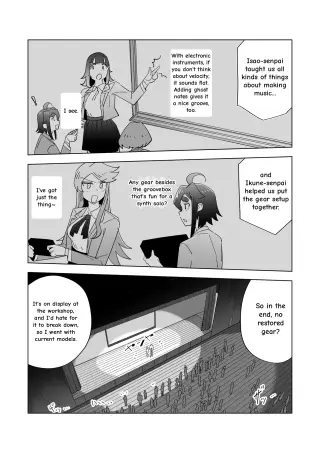
While they prepared for the show, Isao-senpai gave them some tips on making tracks.

With electronic instruments, if you don’t think about velocity, it sounds flat. Adding ghost notes gives it a nice groove, too.
Velocity is how hard you strike a key or pad. (Back in LESSON 10, MIDI sent this strength as a number from 1 to 127, too.) When a person plays the drums, each hit comes out a little different in strength, even in the same rhythm: strong on the beat, softer in between. If every programmed note has the same strength, they all sound alike and the result comes out flat.
A ghost note is a decorative note played very quietly, so you can barely hear it. It isn’t the star, but adding it gives the playing movement and depth. The feel that comes from these tiny wobbles in timing and strength is called groove. That’s where the groovebox gets its name.
Velocity and ghost notes
This makes sound. Start with the volume low.The same rhythm, with only the strength of each hit (velocity) changed. The height of each bar is its velocity. Compare it with “No dynamics.”
Line up the timing with quantize, and make the strength vary with velocity. The trick to programming music is to sort out what to leave to the machine and what to shape by hand.
Playing it on stage
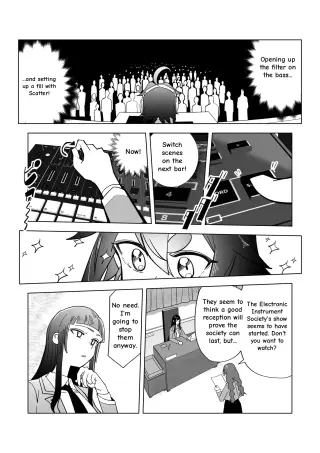
On stage at the show, Kohaku changes the sounds that are playing one after another, right there on the spot (SIGNAL10 p.14).
Now bring in the rhythm section!
Opening up the filter on the bass… and setting up a fill with Scatter!
Switch scenes on the next bar!
- Rhythm section: the drums and bass. These parts are the foundation of the song, and she starts them one track at a time.
- Opening the filter: raising the filter’s cutoff (LESSON 06). The muffled bass gradually gets brighter and flashier.
- Fill-in: a short, decorative phrase played just before the song moves into its next section.
- Scatter: a feature of the MC-707. It applies changes to the phrase that’s playing, on the fly, such as chopping it up finely, repeating it or playing it backward. You can make fill-like changes at the press of a button.
- Scene: a combination of which phrase plays on which track. Switch scenes and the whole section of the song changes at once. The switch happens at the start of a bar, so the transition never slips out of time.
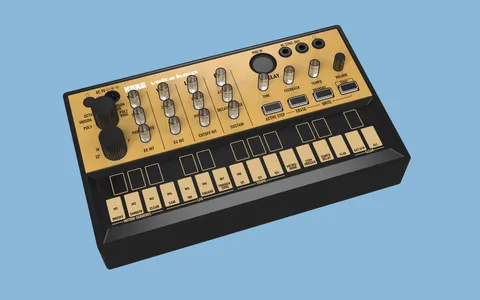
And the high point of the show is a synth solo on the volca keys, which Ikune-senpai told her about (SIGNAL10 p.16). Since the groovebox keeps the backing going, Kohaku can concentrate on her solo.
In SIGNAL 9, Kohaku also thinks about bringing the Moog IIIc (which the manga nicknames the “wardrobe”), but changes her mind: “between hauling it in and things going wrong live, it’s way too much.” A big modular synth (LESSON 05) is impressive, but it’s hard to move and hard to keep running reliably on stage. With a small groovebox, you can play a song from start to finish with very little gear.
Electronic instruments extend music
Before starting to play, Kohaku speaks to the audience from the stage (SIGNAL10 p.12).
Electronic instruments are what extend your “music”!
For people like me who gave up on acoustic instruments, or who lack confidence, they offer a path that doesn’t rely on real-time playing or physical skill.
Even if your fingers can’t move fast and accurately, a sequencer can play for you (LESSON 09). If your rhythm drifts, quantize lines it up. You can make your own sounds (LESSON 06), and you can turn recorded sound into an instrument. Every mechanism we’ve seen in this series has been a tool that extends the reach of people who make music.
Over their 150-year history, electronic instruments have let us enjoy music that is newer, easier, and more open.
From the Telharmonium, which filled a whole building (LESSON 04), to grooveboxes that fit in your hand: little by little, electronic instruments have widened the room for new sounds, for convenience, and for an open place where anyone can make music. Kohaku’s speech goes on: “So why not enjoy them with us?”
Summary
- A groovebox puts a sequencer, sound sources, a sampler and effects into one unit, so one person can perform a whole song.
- Sampling means taking in recorded sound and using it as an instrument. Loops and cut-ups let you make new phrases.
- Quantize lines up the timing of a performance to the nearest line on the grid.
- Differences in velocity (strength) and ghost notes create a “groove” that doesn’t sound flat.
- Over 150 years, electronic instruments have opened up ways to make music that don’t depend on playing skill or physical ability.
That’s the end of Electronic Instrument Basics. You can review all the words from these lessons in the glossary anytime.