In the manga
In SIGNAL 8, Kohaku is puzzled by a word she’s never heard before.

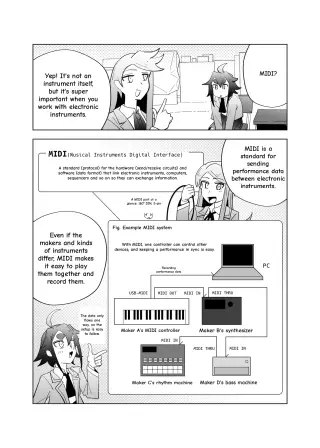
MIDI?

Yep! It’s not an instrument itself, but it’s super important when you work with electronic instruments.
At the end of LESSON 09, we left a question open: “How do you get lots of machines to start together, all at the same tempo?” The answer is MIDI (say it “MID-ee”).
MIDI is a common language for instruments
MIDI is a standard for sending performance data between electronic instruments.
MIDI stands for Musical Instrument Digital Interface. It’s a set of shared rules that Japanese and American instrument makers worked out together in 1983, and it’s still used in electronic instruments and computers all over the world. The rules come in two parts.
- Hardware rules: which cables and connectors to use, and what electrical signals to send. One of them is the round 5-pin connector (a DIN connector), labeled “a MIDI port at a glance” in Ikune-senpai’s diagram in the manga.
- Software rules: which string of numbers stands for things like “key pressed” and “key released.”
Even if the makers and kinds of instruments differ, MIDI makes it easy to play them together and record them.
Before MIDI, every maker had its own way of connecting things, so getting one company’s synth to play along with another company’s drum machine was a real struggle. Once there was a common language, instruments from any company could be connected with a single cable.
It sends the performance, not the sound
What flows through a MIDI cable isn’t the sound itself (the waveform data from LESSON 08). It’s performance information: “which key,” “how hard,” and “pressed or released.” For example, press middle C with a strength of 100 and these three numbers are sent.
- 901001 0000Note On9 = key pressed / 0 = channel 1
- 3C0011 1100Note number 60Middle C (C4)
- 640110 0100Velocity 100How hard the key was pressed (1–127)
The keys are numbered from 0 to 127, and middle C is 60. How hard you press (the velocity) is also a number, from 1 to 127. When you let go of the key, a “Note Off” is sent. The instrument on the receiving end takes this information and plays it with its own sound. It’s a bit like handing someone sheet music and asking them to play it.
There are other messages too: “Control Change” sends the movement of a knob, “Pitch Bend” bends the pitch, and “Program Change” switches sounds. Every message carries a channel (1–16), so a single cable can carry 16 separate parts.
Watch MIDI messages
This makes sound. Start with the volume low.Each time you press a key, what gets sent isn’t the sound itself but three numbers saying “this key was pressed, this hard.” If you have a MIDI keyboard, connect it to your computer and press “Connect MIDI device” to see your playing here too (supported browsers only).
Press the keys in the demo and the messages scroll across the screen above. The sound comes from a little “MIDI sound module” built into this page. If you have a MIDI keyboard, plug it into your computer and press “Connect MIDI device” to see your own playing there too.
How to connect
MIDI has three kinds of ports: OUT sends, IN receives, and THRU passes whatever came in straight on to the next device. As in the diagram in the manga, you connect OUT to IN, then THRU to the next IN, and so on down the line.
Connecting instruments together
Recording on a computer
Kohaku is impressed: “The data only flows one way, so the setup is easy to follow.” Because the data always travels in one direction, from OUT to IN, it’s easy to trace where information comes from and where it goes.
Keeping time: “Send us an FBH”
Besides performance information, MIDI also has messages for keeping several machines at the same tempo. If one device keeps sending a timing signal that ticks 24 times per beat (the clock), every machine that receives it runs at the same tempo. On top of that, there are three commands that go out to everyone at the same moment.
- FA (Start): everyone starts together from the top of the song.
- FC (Stop): everyone stops together.
- FB (Continue): everyone picks up together from where they stopped.
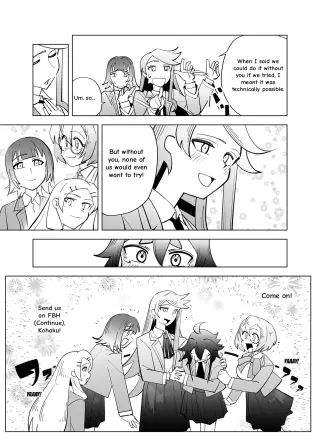
You can hear the difference between the three with the buttons in the demo above. At the climax of SIGNAL 8, Ikune-senpai tells Kohaku, “Send us an FBH (Continue), Kohaku!” (SIGNAL8 p.14). That FBH is this FB (the H marks it as a hexadecimal number). It doesn’t mean “start over from the beginning”; it means “everyone, once more, from where we stopped.” If you know MIDI, you can really feel what that one line means.
“MIDI” means lots of things
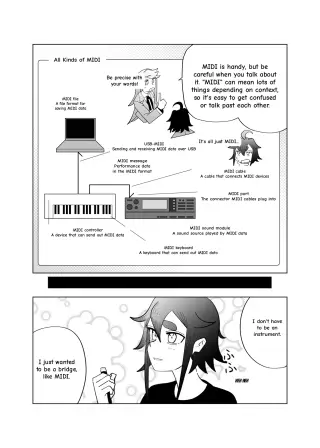
MIDI is handy, but be careful when you talk about it. “MIDI” can mean lots of things depending on context, so it’s easy to get confused or talk past each other.
Kohaku’s reaction: “It’s all just MIDI…” Here’s a rundown of the words in the manga’s diagram.
- MIDI messageThe performance data itself, such as “Note On.”
- MIDI cable / MIDI portThe cable that carries the messages, and the round 5-pin socket it plugs into.
- USB-MIDIA way to send and receive MIDI messages over a USB cable.
- MIDI controller / MIDI keyboardA device that sends messages out. Many make no sound on their own.
- MIDI sound moduleA device that receives messages and plays sounds.
- MIDI fileA file that stores messages in time order. It’s a lot like sheet music.
A common mix-up is “the MIDI sound.” When you open a MIDI file on a computer, it sometimes plays back sounding a bit cheap, but that isn’t MIDI’s fault. It’s the sound of whatever MIDI sound module happened to play it. MIDI is really just something like sheet music: play the same file on a good sound module and it will sound good.
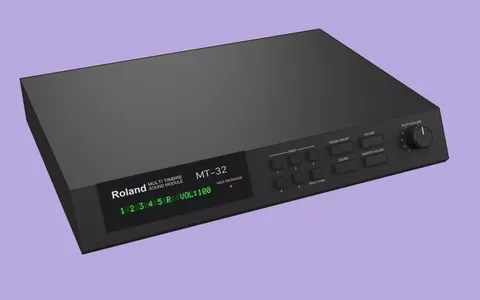
Roland’s Music-kun, released in 1988, was a set that bundled the MT-32 MIDI sound module, a card for connecting it to a computer, and music-making software. It’s said to mark the beginning of “DTM” (desktop music, the Japanese name for making music on a computer), and it was later registered as Future Technology Heritage. After that came a standard called GM (General MIDI), which made sure the same number played the same kind of instrument on any sound module, and MIDI files went on to power the music in computers and video games.
MIDI is a set of rules from more than 40 years ago, but it’s still going strong. In 2020, MIDI 2.0 was announced, which can carry even finer detail in a performance.
A bridge
The night after she hears about MIDI, Kohaku holds a cable in her hand and murmurs this.
I don’t have to be an instrument. I just wanted to be a bridge, like MIDI.
MIDI connects instruments from different makers, of different kinds, born in different years, with one shared language. Music that one machine can’t play alone becomes possible once they’re connected. This is where the story of electronic instruments joins up with the story of people.
Summary
- MIDI is a shared set of rules (since 1983) that lets electronic instruments and computers exchange performance information.
- What it sends isn’t sound but performance information: “which key, how hard, pressed or released.”
- Connections run one way, from OUT to IN. Channels let you keep 16 parts separate.
- With Start (FA), Stop (FC), Continue (FB) and the clock, many machines can run together in sync.
In the last lesson, Kohaku puts everything so far to work and plays a live show with a single machine.